Tampilkan postingan dengan label Design. Tampilkan semua postingan

Sabtu, 11 Juni 2011

EAGLE Version 5.11

EAGLE is a schematic capture and PCB layout tool.Its popularity stems from its os support for Windows, Linux, Macintosh and plentiful third-party part libraries.
The product acronym stands for Easily Applicable Graphical Layout Editor.

.: What's new in version 5.11?
  • The User Language dialog object dlgStringEdit now accepts additional parameters to implement an input history.
  • The User Language function system() no longer prompts the user for confirmation before executing the command.
  • Modified the User Language network functions so that they use the proxy as set up in "Help/Check for Update/Config".
  • DesignLink enhancements: Check price & availability for all parts of a schematic, load a shopping cart (designlink-order.ulp and designlink-inc.ulp, replacing designlink.ulp).
  • DesignLink: Removed the "Customer Details" dialog as the user administration is not in service on Element14 web page.
  • DesignLink: Added a text export function to order list (designlink-order.ulp) and library tool (designlink-lbr.ulp).
  • Added a PCB quote service as ULP (pcb-service.ulp), that can extract manufacturing parameters from the board and send to an Element14 site to get a quote for it.
  • The CHANGE command no longer selects airwires when changing parameters that don't apply to airwires (like layer or width).
  • Reduced the minimum resolution in the EXPORT IMAGE command to 1.
  • The MENU command can now handle icons.
  • The MENU command now automatically turns on the textual command menu.
  • By default the textual command menu is now located right next to the action toolbar.
  • The default eagle.scr file now contains MENU commands that configure the textual command menu with buttons for DesignLink and the new PCB service.
  • The new SET variable CONFIRM can be used to automatically confirm message dialogs (see "Help/Editor Commands/SET/Automatic Confirmation").
  • If the user has modified the widths of the columns in a dlgListView, they no longer fall back to their initial values when a different item is selected.
  • The new command line option '-U' can be used to define the location of the 'eaglerc' file in which EAGLE stores user settings. Note that beta versions of EAGLE no longer store their user settings in a separate 'eaglerc' file with the extension '.beta'. They now use the same 'eaglerc' file as officially released versions. If you want to keep things separate for beta versions, use the '-U' option.
  • The new SET parameter Option.AutoLoadMatchingDrawingFile can be used to suppress the query "Do you also want to load ...?" in the EDIT command.
  • The new SET parameters Cmd.Name.RenameEntireNetByDefault and Cmd.Name.RenameEntireSignalByDefault can be used to control the default behavior of the NAME command.
  • Support relative paths of image links in libraries in ADD and REPLACE dialog.
  • Bugfixes
Password rar: bakumatsu16.blogspot.com


Sabtu, 04 Juni 2011

PhotoZoom Pro 3.8.1 Full

PhotoZoom Pro 3.8.1 - Tidak senang dengan kualitas pembesaran gambar digital Anda? Mengubah ukuran gambar Anda dengan menggunakan BenVista PhotoZoom Pro 3, dan anda akan mendapatkan hasil yang luar, pemenang penghargaan teknologi S-Spline! Dilengkapi dengan S-Spline Max, generasi terbaru dari algoritma dipatenkan S-Spline BenVista's, PhotoZoom Pro 3 menciptakan pembesaran citra kualitas tiada bandingnya.

PhotoZoom Pro 3 beats salah satu solusi alternatif, seperti teknik Bicubic Photoshop, metode fraktal-based, dan standar industri yang sering disebut.

Banner Designer Pro 4.0.0.0 Full

Banner Designer Pro adalah sebuah aplikasi untuk mendesain banner dengan sederhana, tetapi dengan fitur yang sangat kuat. Bagian terbaik dari Banner Designer Pro adalah bahwa anda tidak diharuskan untuk memiliki keterampilan yang intensif Flash. Dengan fungsionalitas pilih dan drop sederhana anda dapat menambahkan elemen yang berbeda untuk banner anda dan membuat banner yang menarik dengan mudah lengkap.

Professionally designed banner templates:
Banner Designer Pro provides a professionally designed set of attractive templates as a starting step to your banner.

Select a banner size to suit your requirement:
You can select from a set of 11 banner size options available or design a banner of the specific size you require.

Add shapes to your banner:
Select from a database of shapes and place them according to individual design preference on the banner.

Minggu, 15 Mei 2011

Focus Photoeditor 6.3.3

Focus Photoeditor 6.3.3 adalah software editor foto yang powerfull, mudah digunakan editor foto pemula yang dapat digunakan untuk meningkatkan dan memperbaiki semua jenis foto digital dan untuk menghasilkan grafis untuk web, rumah dan kantor. Anda dapat memperoleh foto digital dari file, dari aplikasi lain, atau dengan bantuan scanner atau kamera digital dan mulai bekerja dengan cepat. memiliki fungsi perbaikan otomatis yang berbeda dan memperbaiki foto Anda dalam hitungan detik. Dengan kemampuan yang ada pada software ini, maka anda dapat meningkatkan penampilan pada gambar, tanpa kehilangan kualitas apa pun, Focus Photoeditor 6.3.3 dapat digunakan sebagai alat yang kuat dan profesional oleh fotografer pemula dan lanjutan.

Minggu, 20 Maret 2011

AAA Logo Business 2010 3.1

AAA Logo Business 2010 3.1 adalah sebuah program/ aplikasi untuk mendesain logodengan macam-macam bentuk. AAA Logo Business 2010 3.1 sangat mudah untuk digunakan, jadi bagi yang kesulitan menggunakan program CorelDraw atau Photoshop bisa menggunakan program ini. dengan tersedia 8.500 logo objects dan 500 premium logo templates kalian dapat memulai membuat logo. 
Dengan AAA Logo Business 2010 3.1 Anda dapat membuat hampir semua jenis grafis situs web atau bisnis grafis untuk pencetakan resolusi tinggi. Logo, banner, tombol, header dan ikon untuk website Anda dengan warna yang kaya, gradien, bayangan dan grafis reflections. Busnis seperti kartu nama, kop surat, poster dan alat tulis usaha lainnya dapat dirancang dan dicetak langsung dari AAA Logo Business 2010 3.1 dengan gambar dapat diekspor untuk digunakan dengan aplikasi lain.

Features:
  • Not just for Logo Design !
  • Design logos / business graphics in any industry
  • Create professional, high resolution images in clicks
  • Get started without having to open a manual
  • Get a lean, slim business graphics design machine

[INSTRUKSI PENGINSTALLAN]
  1. Unzip file rar.
  2. Matikan internet anda.
  3. Install software dalam mode trial.
  4. Jika disuruh merestart PC jangan dilakukan !!!
  5. Sekarang tutup programnya, tentunya tutup juga programnya yang ada di system tray yang terletak di bagian kanan bawah dekat clock desktop anda.
  6. Buka file key dan buat key lalu masukkan keynya. lalu Restart Programnya (Open the key file and create a key and insert it then restart the PROGRAM).
  7. Sekarang seharusnya sudah teregister.
*Jika tidak bisa menggunakan keygen, kalian bisa menggunakan Serial yang ada dibawah ini:


  • ebBB-GrR8-4Mee-t2n5
  • hRDD-hd9M-4nHB-4AtF
  • E6T9-fqr3-8fFd-nEgb
  • 6M84-bM9A-MtHQ-nthF
  • NgAH-eTh5-df85-QRqH
  • ThbN-HEE7-hMmq-tdG8

TOTAL SIZE 8.1 MB

Selasa, 08 Maret 2011

Adobe Photoshop CS5 Extended v12.0

Adobe® Photoshop® CS5 Extended adalah solusi utama untuk pencitraan digital tingkat lanjut, memberikan semua editing dan compositing kemampuan Photoshop CS5 ditambah alat terobosan yang memungkinkan Anda membuat dan mengedit 3D dan gerakan berbasis konten.


Installation Instructions:

1.Extract The Downloaded rar Files.
2.Setelah di extracted, buka Set-Up.exe.
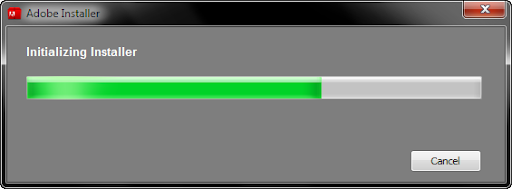
3.sekarang Inststalasi sedang berjalan


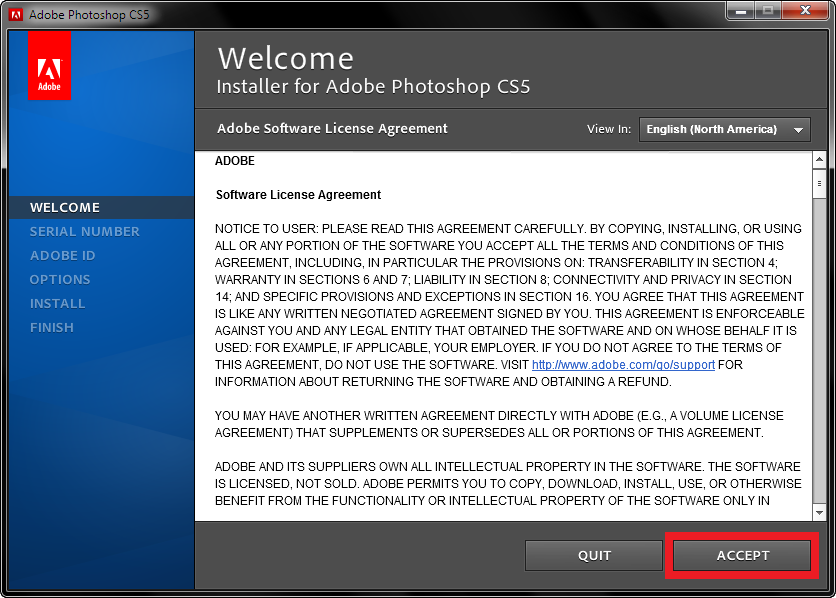
4.Click "Accept" ketika tampilan sudah seperti ini:


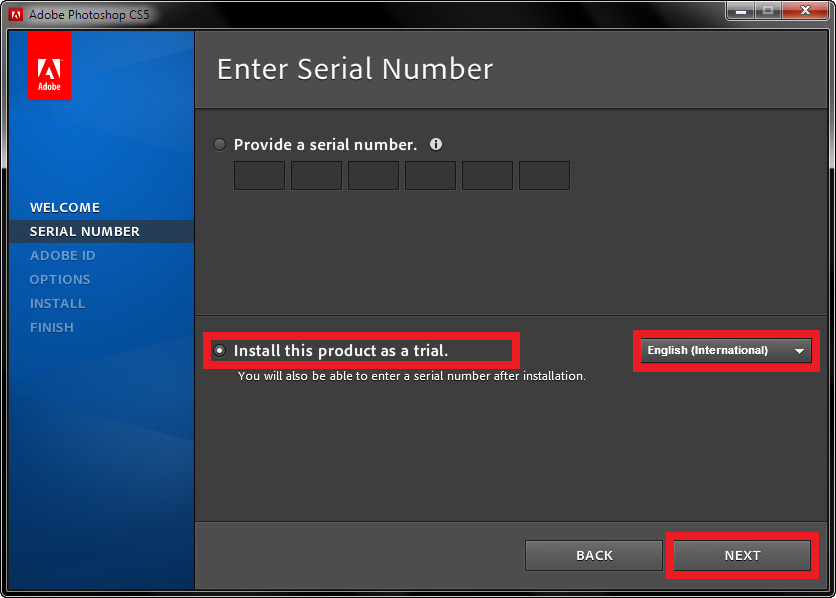
5.Pilih 'Install this product as a trial'. Pilih language kemudian click Next. 

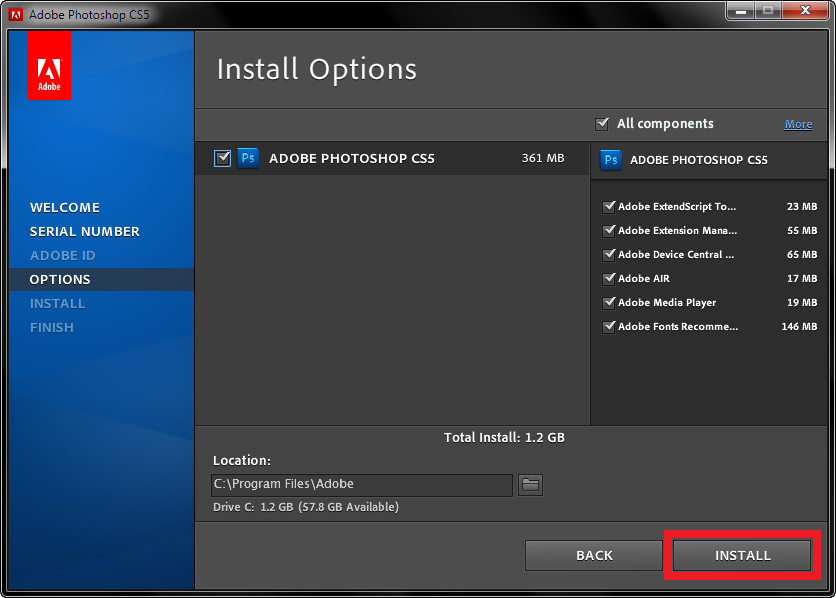
6.Sekarang click bagian Install dan tunggu sampai selesai.

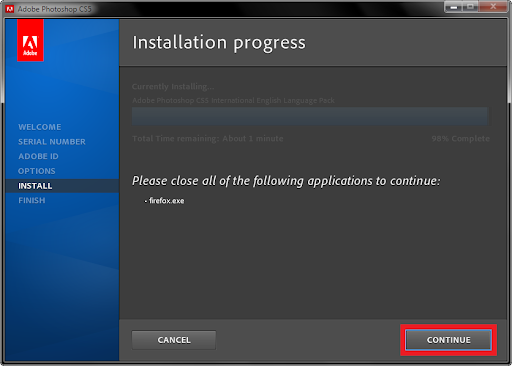
7.jika diminta untup menutup Broswer anda, tolong lakukan dengan mengclose browser dan click "Continue".


8.Click "Done".
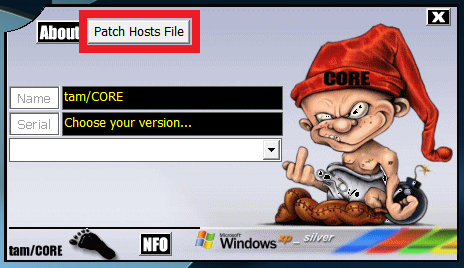
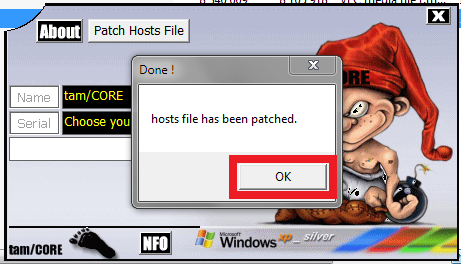
9.Open Keygen.exe and Click "Patch Hosts File". (Please Note That If it says that files are already patched then Simply Click OK).

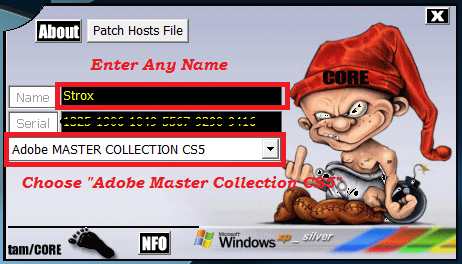
10.Now Select "Adobe Master Collection CS5" from the keygen and enter any name (more than 4 chars). Copy The Serial (Ctrl+C).


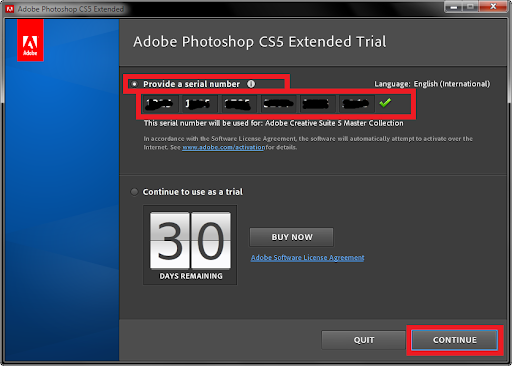
11. Buka Photoshop. Jika menanyakan serial number. Select "Provide a serial number" and enter a generated serial number from the keygen (Or Simply Paste it by Ctrl+V). When entered correctly click on "continue".


12.Selesai. Enjoy using your new copy of Photoshop CS5! Silahkan kirimkan komentar jika ada yang mau ditanyakan.


STEP 2: Matikan File Host
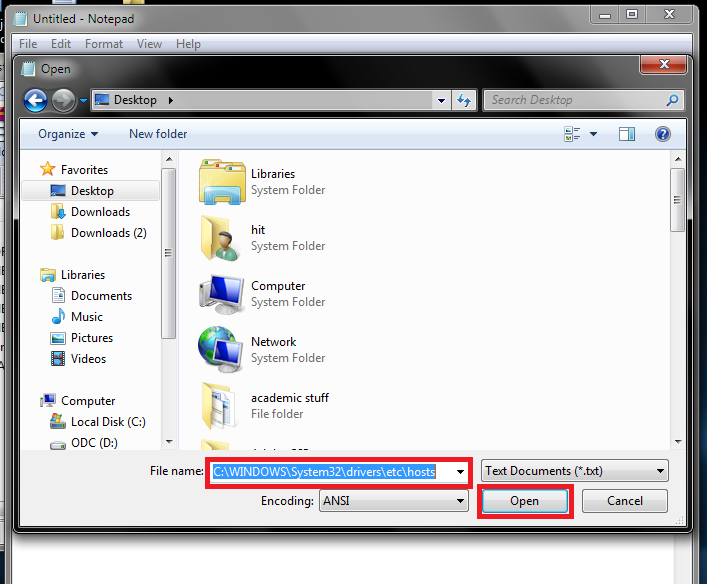
1. Buka Notepad. Sekarang Click "File" kemudian "Open".
2. Sekarang masukan Filename " C:\WINDOWS\System32\drivers\etc\hosts " dan Click "Open".


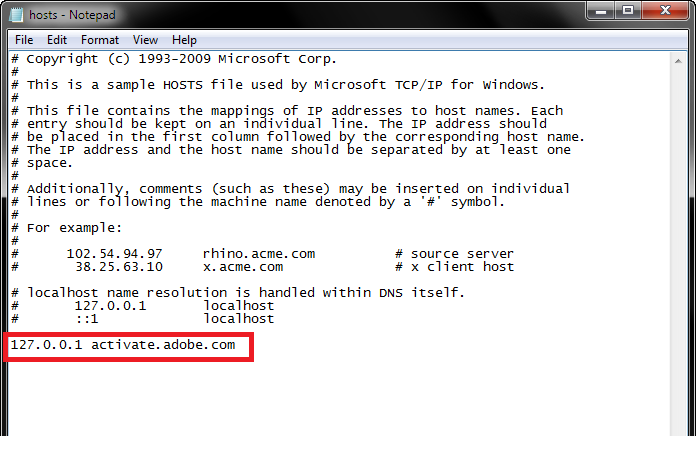
3. Now Append The Line 
127.0.0.1 activate.adobe.com
At The End Of The File. Now Save The File And Enter The Serial Again. 

Jika Windows mengatakan bahwa tidak dapat menyimpan file ini, maka pastikan bahwa file ini NOT read only. Jika seperti itu, klik kanan berkas host di "C: \ WINDOWS \ system32 \ drivers \ etcsee its properties and uncheck the read only box.

Adobe CS5 Extended
----------------------------------
Keygen

Rabu, 23 Februari 2011

CorelDRAW Graphics Suite X5 Full Version

Siapa yang tidak tahu software yang satu ini ? Software yang sudah dikenal sebagai penghasil vector yang bagus dan mudah dalam penggunaannya. walaupun saat ini sudah banyak program serupa bahkan dari Adobe pun sudah lama mengeluarkan program yang memiliki fungsi yang mirip dengan CorelDRAW (Adobe Ilustration), tapi bagi sebagian orang seperti saya yang sudah terbiasa memakai Corel dibanding Adobe pasti akan lebih memilih menggunakan CorelDRAW.
CorelDRAW Graphics Suite X5 menawarkan semua alat yang diperlukan untuk pekerjaan produktif desainer kontemporer. Intuitif alat untuk vektor ilustrasi dan tata letak halaman memungkinkan Anda untuk membuat solusi desain yang hebat.
Gambar raster dapat dengan mudah dapat di edit dan diubah menjadi scalable vector file. Apapun proyek Anda, CorelDRAW Graphics Suite X5 menyederhanakan alur kerja dan menginspirasi Anda dengan peluang-peluang baru untuk kreativitas. 
Spesifikasi Minimum :
*Microsoft NetFramework v3.5 
* Microsoft® Windows® 7, Windows Vista®, Windows® XP, with latest service packs installed (32-bit or 64-bit editions).
* Intel® Pentium® 4, AMD Athlon™ 64 or AMD Opteron™.
* 512 MB RAM (1 GB recommended).
* 750 MB hard disk space (1 GB for typical installation without content). Up to 6GB needed to install extra content.
* Mouse or tablet.
* 1024 x 768 screen resolution (768 x 1024 on a Tablet PC).
* DVD drive
* Microsoft® Internet Explorer® 7 or higher, or Firefox, or Opera, or Chrome, or Safari etc

Download (CorelDRAW Graphics Suite X5) 

Download Keygen

Cara Menggunakan Key Generator:
1. Klik Instal "CorelDRAWGraphicsSuiteX5Installer_ENBuka".
2. Pilih tulisan "I have a serial number".
3. Buka Key Generator dan masukkan serial number yang di dapat di Key Generator (copy) Ctrl+C dan Paste Ctrl+V ke serial number CorelDRAW X5, perhatian! jangan di close dulu (Key Generator)!
4. Tunggu hingga proses instalasi selesai.
5. Setelah selesai instalasi, buka CorelDRAW X5, terus muncul kotak permintaan aktivasi, klik tombol "Other Activation Options", Phone corel.
6. Disitu ada 3 kotak, Serial Number (sudah terisi), Installation Code (sudah terisi), Activation Code (kosong).
7. Kembali ke Key Generator tadi, isi kotak "Installation Code" (kotak ke 2), ketik kodenya di Key Generator, tanpa tanda (-).
8. Setelah Installation Code di Key Generator terisi, terus klik tombol Activation Codenya dan akan muncul kode aktivasinya (kotak ke 3), copy dan paste lagi di kotak Activation Code di CorelDRAW X5 nya, klik next.
9. Selesai.

Sumber: Kaskus

Selasa, 11 Januari 2011

Adobe InDesign CS5 Portable

Adobe InDesign CS5 software provides precise control over typography and built-in creative tools for designing, preflighting, and publishing documents for print, online, or to mobile devices. Include interactivity, animation, video, and sound in page layouts to fully engage readers. Adobe InDesign CS5 software introduces breakthrough productivity and collaboration features such as simplified object editing and selection, integration with Adobe CS Live online services,* and the ability to create rich interactive documents that attract and engage readers. CS Live services are complimentary for a limited time.
What's new in InDesign CS5:
Interactive documents and presentations new
Add interactivity, motion, sound, and video to documents and presentations, exporting directly to SWF for playback in the Adobe Flash Player runtime.
Simplified object selection and editing new
Perform repetitive layout tasks efficiently using new and enhanced tools and on-object controls.
Integration with Adobe CS Review
Create and share reviews online while working in InDesign with Adobe CS Review, part of CS Live online services. See feedback in the context of your page layout.
Track Text Changes
Mark up text directly in InDesign, easily tracking copy revisions.
Redesigned Layers panel
Easily manage page items with a redesigned Layers panel that is more like the one in Adobe Photoshop and Illustrator software.
Export to Flash Professional
Export InDesign documents to Flash Professional to add sophisticated interactivity, animation, and navigation to complex layouts.
eBook creation
Create compelling eBooks in the EPUB format for the Apple iPad, Sony Reader, Barnes & Noble nook, mobile phones, and other devices.
Maintain the fidelity of your original file
Hand off page layouts from InDesign to Adobe Flash Professional with even greater fidelity. Add sophisticated interactivity to your documents without compromising on page design.
PlayMultiple page sizes
Create pages with different sizes in a single document.
Paragraphs that span or split columns
Quickly create text that spans or splits into multiple columns in just a few steps.
Production enhancements
Find and drag images into page layouts from Adobe Mini Bridge without leaving InDesign. Document-installed fonts can help eliminate missing font issues.
Live Captions
Generate static or live captions automatically from image metadata.


Jumat, 30 April 2010

Artisteer 2.4.0.25435 Final Multilanguage

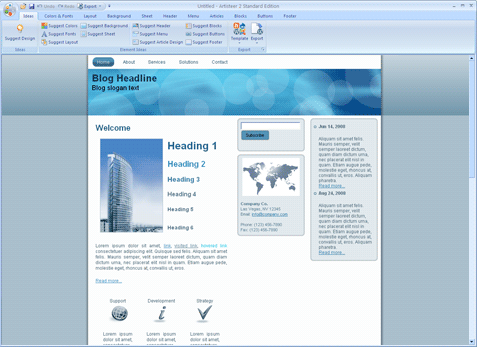
I think Aristeer really very amazing, this one application that allows you to design websites in a matter of minutes, and only a few clicks, are not required proficiency in memprogam, and are not required also in melayout kemahiraan web using html or css. Artisteer duty mensuggest template that you want, then you can customize your template with just a few clicks, without having to understand html or css, and customizable templates that can directly result in the export to Blogger, Joomla, Wordpress, DotNetNuke, and other CMS products, you not need to learn to design websites with photoshop, css, html or other web design technologies. What is interesting is the application is very easy to use. In officialnya website, they say, with Artisteer you'll become an expert in web design without using Photoshop, Dreamweaver, simply by artisteer.
Portable Artisteer Standard Edition v2.4.0.25435
Artisteer - the first and unique product of automation a web of design which instantly creates a fantastic kind,unique templates for MS Joomla,Drupal,Wordpress,themes for your blog or a HTML-page.

* Design awesome WordPress Blogs, professional Joomla! and Drupal templates, and cool Website designs in Minutes
* Easy to Use
* No need to learn Photoshop, CSS, HTML or other technologies
* Export as Wordpress Theme or CMS Template
With Artisteer YOU immediately become a Web design expert, editing and slicing graphics, coding XHTML and CSS, and creating Web design templates and Joomla, Drupal and Wordpress themes - all in minutes, without Photoshop or Dreamweaver, and no technical skills.

Top 10 reasons to use Artisteer
1. Generate cool Web design ideas.
2. Adjust generated dhttp://samura1.softarchive.net/addnews/esigns to create great looking Web and Blog templates.
3. Create perfectly correct, validated HTML and CSS that conform to Web standards.
4. You don't need to learn Photoshop, CSS, HTML and other Web technologies to create great looking designs, including images and buttons.
5. If you are a Web designer, generate ideas, prototypes and quick Websites for your clients and friends.
6. Choose and use many included design elements, from backgrounds to photo objects and buttons.
7. Automatically solve problems with image aliasing, Web browser compatibility and other details requiring time and knowledge.
8. Learn how to create professional HTML and CSS code.
9. Save money on Wordpress Themes and Web design templates.
10. If you don't have the time, hire your kids to create great looking Website for you.